

Welcome to DMPlay. DM Play is an online gaming platform offering a variety of games and entertainment options in one place. Users can explore different game categories, access their accounts, check available rewards and manage their wallet through the platform.
Whether you are interested in colour prediction games, number games, Aviator-style games or casino classics, DMPlay brings different gaming options together. The platform also provides account registration, login and wallet facilities for users who want to access its services.
Why Play DMPlay Game?
DMPlay aims to provide a convenient gaming experience with account and wallet features in one place. Here are some of the features users can explore:
- Quick Access: Open your account through the login page using your registered details.
- Multiple Games: Explore colour prediction, lottery, number games, Aviator-style games, slots and other available categories.
- Mobile Access: Use the platform through a compatible mobile browser or application.
- Account Management: Check your profile, wallet balance and available account options.
- Rewards and Offers: Explore available bonuses, promotional offers and referral features.
- Customer Support: Find assistance through the support options provided on the platform.
Top Categories – DMPlay Games
DMPlay brings different types of games together for users who prefer short gaming sessions as well as those who want to explore more categories.
Colour Prediction Mini Game
The colour prediction section allows users to select from available colours such as red, green and violet. Different rounds may be available with different time intervals, depending on the platform’s current game options.
Users should read the game rules and understand how each round works before participating.
DMPlay Lottery and Number Games
The lottery and number-game section may include formats such as K3, 5D and other number-based games. Users can explore the available options, check the displayed rules and view results through the platform.
DMPlay Aviator / PVC Games
Aviator-style games are based on a moving multiplier and timed decisions. Users should understand the rules, limits and risks of the game before taking part.
Casino, Slots and Fishing Games
The casino section may include different slot formats, fishing games and other interactive options. Available games and categories can change depending on platform updates.
How to Login to DM Play
Use the following instructions to access your account through the dm play login page.
Open the DMPlay Login Page : https://dmplays.org/
Visit the DMPlay login page through your browser or compatible application. Make sure you are using the correct website before entering your account details.
Choose Your Login Method
Check the login screen for the available options. Depending on the account setup, you may be able to log in using your registered mobile number or email address.
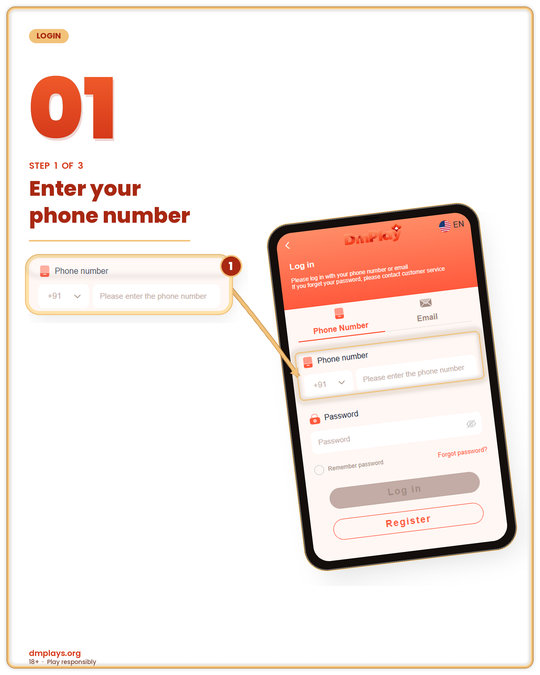
Step 1: Enter Your Phone Number
If you are using mobile-number login, select the appropriate country code and enter the mobile number linked to your account.
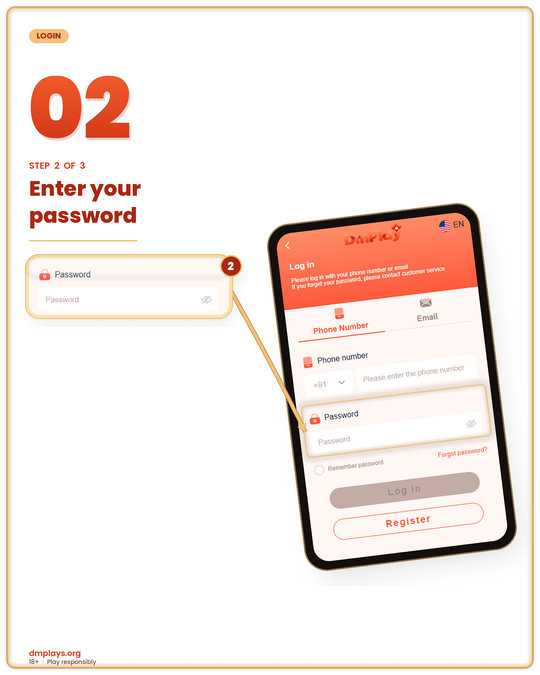
Step 2: Enter Your Password
Type your registered account password in the password field. Check the details carefully before continuing.
Remember Password Option
If you are using your personal device, you may use the Remember Password option if it is available. Avoid saving your password on public or shared devices.
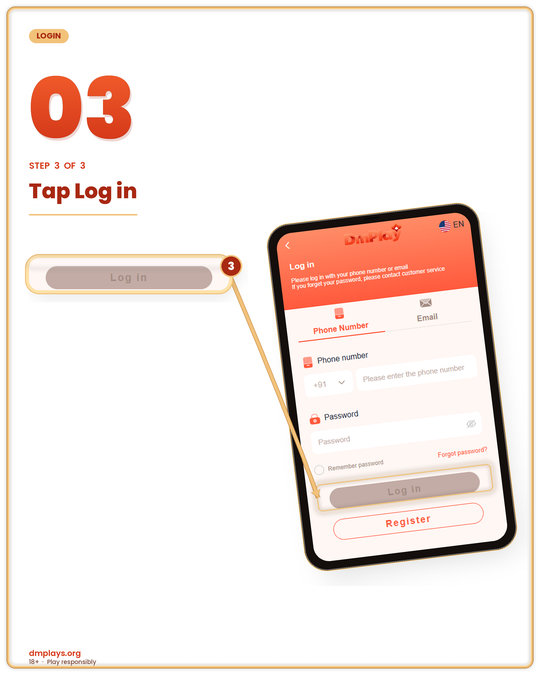
Step 3: Click on Login
Select the Login button. If your account details are correct, you should be taken to your DMPlay account dashboard.
DMPlay Login and Registration Option
New users can select the Register option displayed on the login screen to create an account. Existing users can use their registered details to access their accounts without registering again.
Forgot Password Option
If you cannot remember your password, look for the Forgot Password option on the login screen. Follow the instructions displayed there to recover access to your account.
DMPlay Customer Service
For login difficulties, account access problems or other platform-related questions, check the Customer Service option available on the website or application.
DMPlay Login Safety Tips
Always access your account through the correct website. Keep your password and OTP private, avoid logging in on unknown devices and do not share sensitive account information with anyone.
DMPlay Download – Access the Platform
Users looking for the dmplay download option can check the platform’s official website for available access methods. Depending on device compatibility, the platform may provide browser-based access or an Android application.
Before downloading anything, check the website address and make sure the file is provided through the platform’s intended download page.
DM Play APK for Android
The dm play apk option may be available for Android users through the platform’s download section. Before installing an APK file, review the displayed version, installation instructions and device requirements.
Do not install files received from unknown websites or third-party messages.
How to Register on DMPlay?
To create a new account, follow the steps below on the dm play register page.
Go to the DMPlay Registration Page : https://dmplays.org/
Open the registration page through your browser or compatible application. Check that you are on the correct page before submitting personal information.
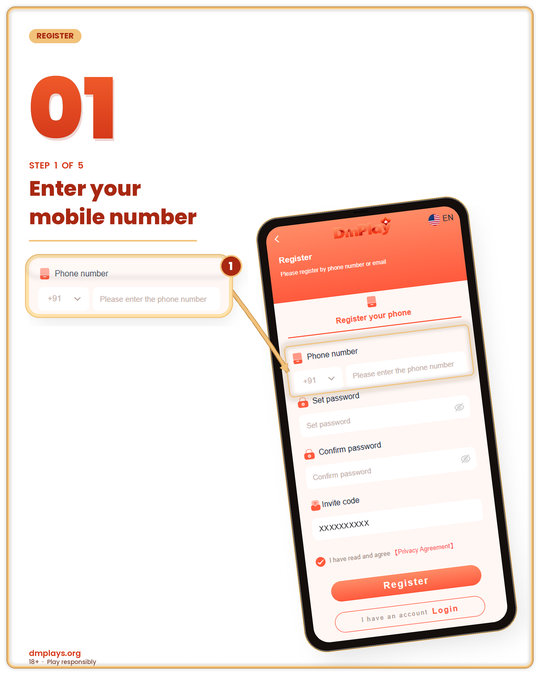
Step 1: Provide Your Contact Number
Enter your mobile number in the Phone Number field. Select the correct country code if the option is provided.
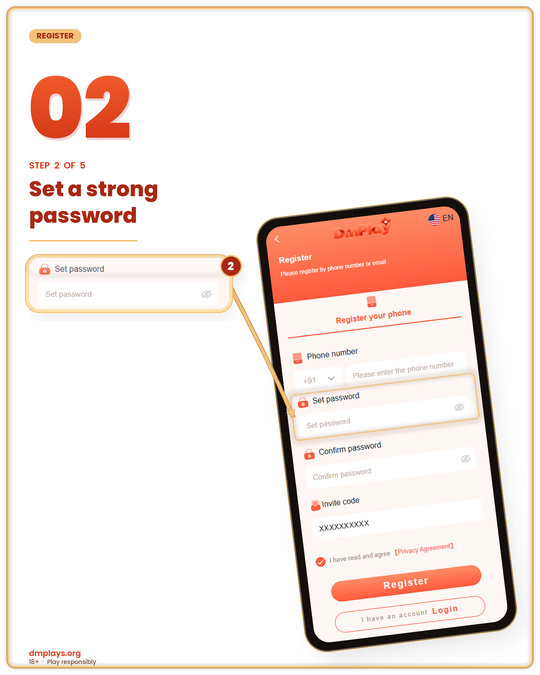
Step 2: Create a Password
Create a password for your account. Choose a password that is difficult for others to guess but that you can remember.
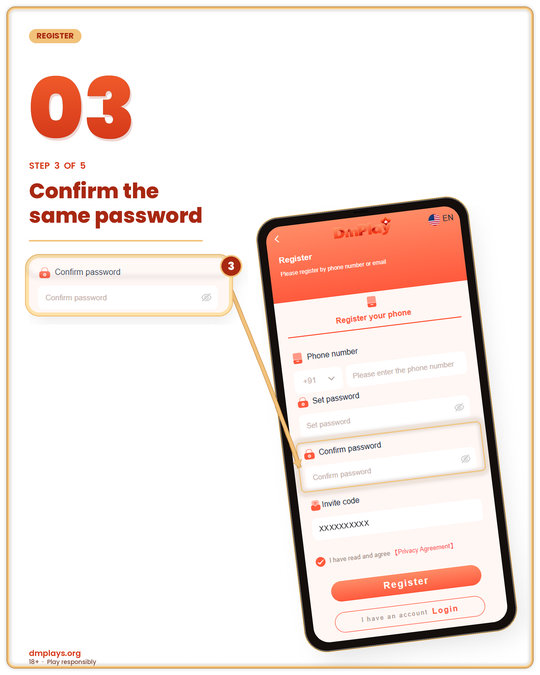
Step 3: Confirm Your Password
Enter the same password again in the Confirm Password field to make sure both entries match.
Step 4: Complete the Invite Code Field
If you have an invitation or referral code, enter it in the Invite Code field if one is provided. Check whether the field is optional or required.
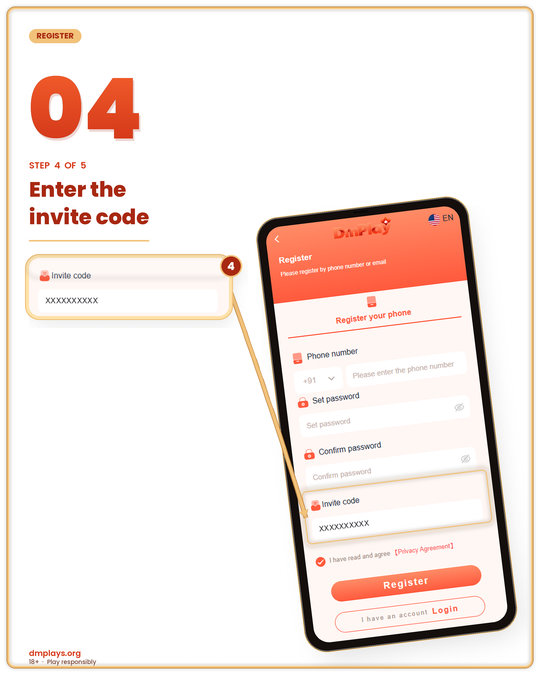
Step 5: Accept the Privacy Agreement
Read the displayed terms and privacy information. If you agree with the terms, select the relevant agreement checkbox.
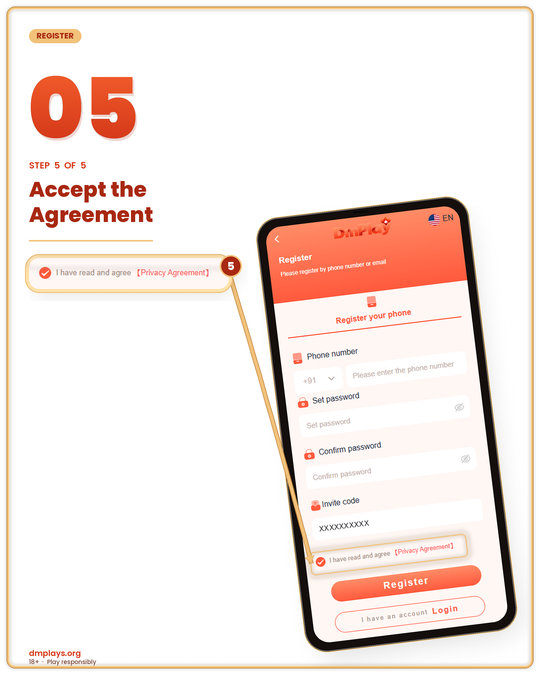
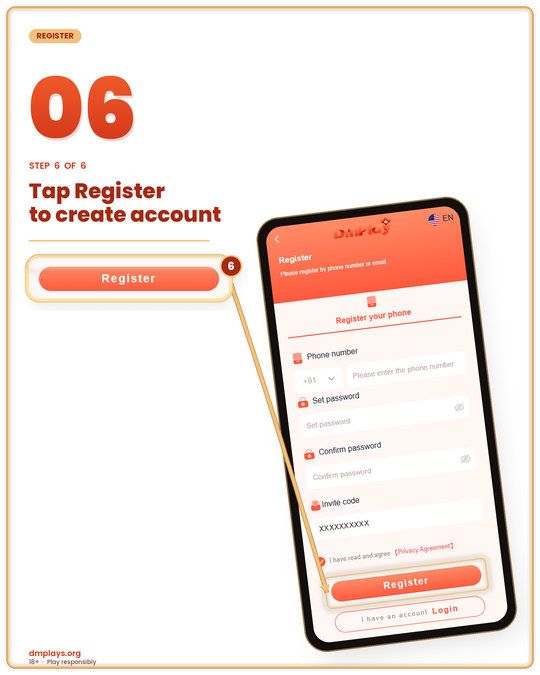
Step 6: Click the Register Button
Review the information you entered and select Register. Follow any additional verification instructions displayed on the screen.
DMPlay Register – Existing Account Holders
If you already have a DMPlay account, you generally do not need to create another one. Open the login page and enter your registered account details.
How to Do DMPlay Deposit and Withdraw?
The wallet section is where users can check their account balance and available transaction options. Depending on the platform’s current configuration, the wallet may display different deposit and withdrawal methods.
Users should review the payment instructions, transaction limits and applicable conditions shown inside their own accounts before making a transaction.
How to Deposit Money on DMPlay?
Follow the steps below to understand the deposit process:
Step 1: Login to Your DMPlay Account
Open the platform and log in using your registered account details.
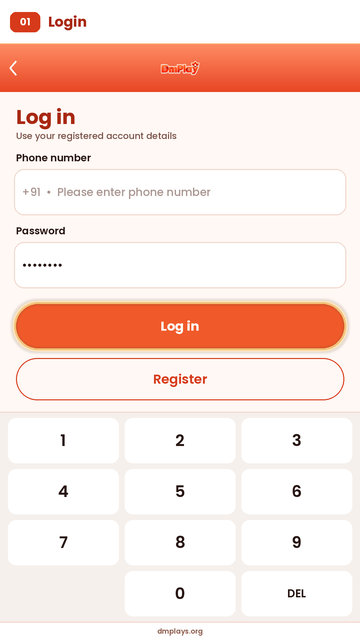
Step 2: Go to the Deposit Page
After logging in, open the Wallet or Recharge section and select the Deposit option.
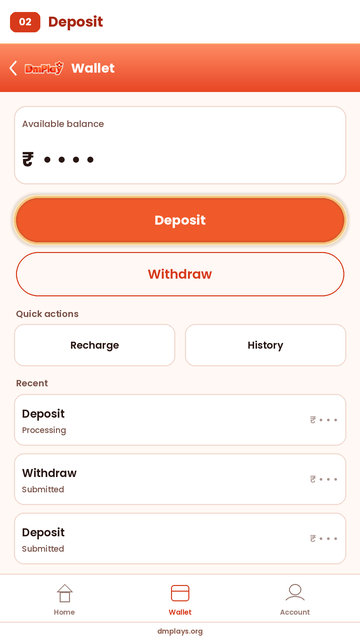
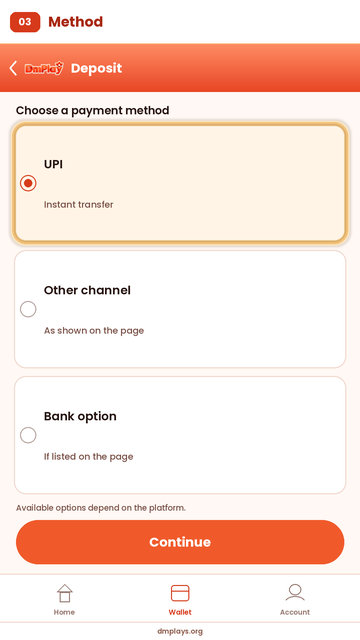
Step 3: Choose a Deposit Method
Check the payment methods displayed on the deposit page. Available options may include UPI or other payment channels, depending on the platform.
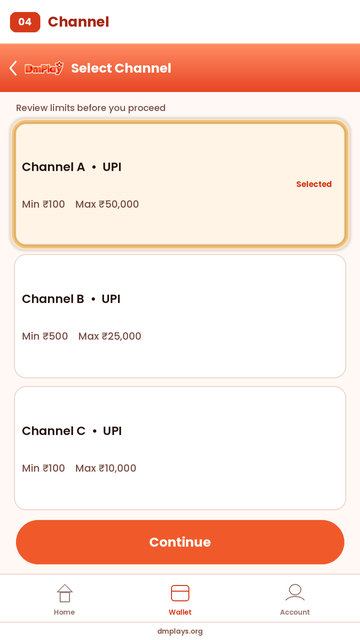
Step 4: Select a Deposit Channel
If multiple channels are displayed, select the one you intend to use. Review the displayed limits and instructions before proceeding.
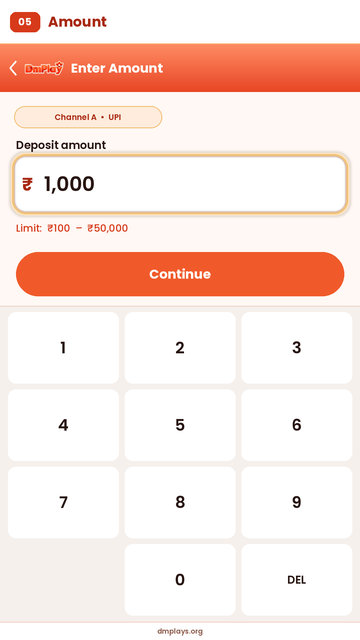
Step 5: Enter the Deposit Amount
Enter the amount you want to deposit. Make sure it falls within the limits shown on the payment page.
Step 6: Follow the Recharge Instructions
Read the payment instructions carefully. Verify the recipient details and transaction amount before completing the payment.
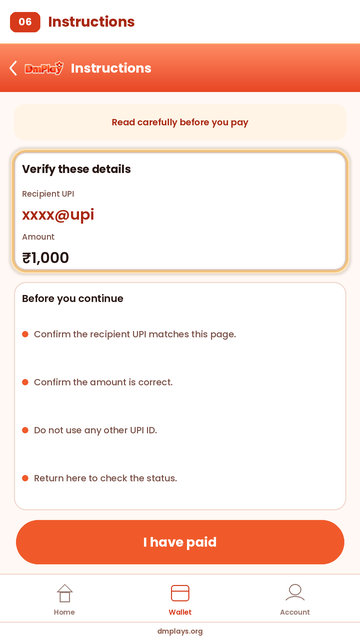
Step 7: Complete the Deposit
Follow the displayed payment process and return to your account to check the transaction status.
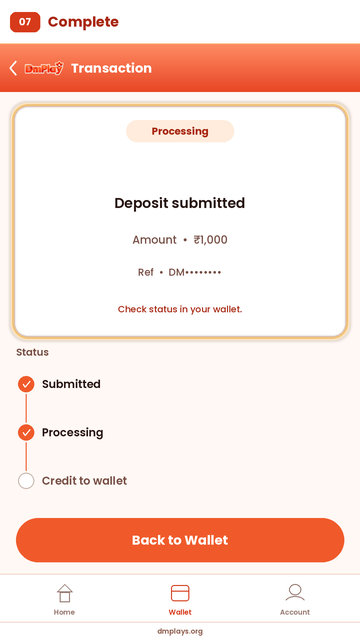
Important Deposit Instructions
- Check the payment details before transferring money.
- Follow the amount and payment instructions displayed for your transaction.
- Do not make another payment for the same order without checking its status.
- Keep your transaction reference for future communication.
- Check Deposit History after completing the payment.
- Contact the platform’s support team if a transaction remains unresolved.
How to Withdraw Money on DMPlay?
Follow these steps to understand how the withdrawal section works:
Step 1: Open the Withdraw Page
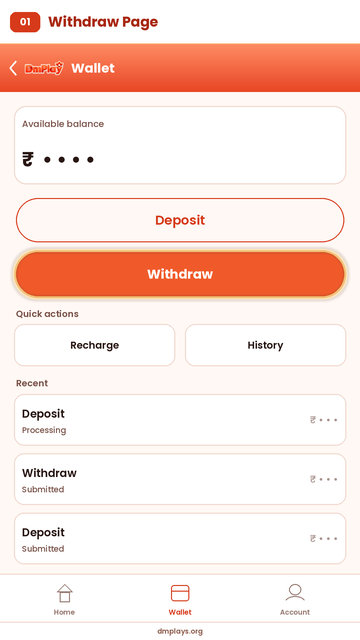
Log in to your account and open the Wallet or Withdraw section.
Step 2: Check Your Available Balance
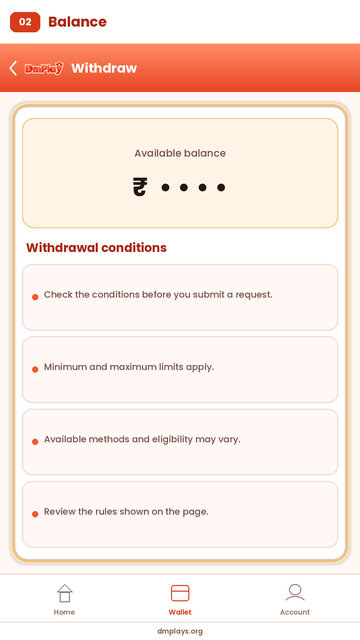
Review the balance displayed in your account. Check the withdrawal conditions before submitting a request.
Step 3: Choose a Withdrawal Method
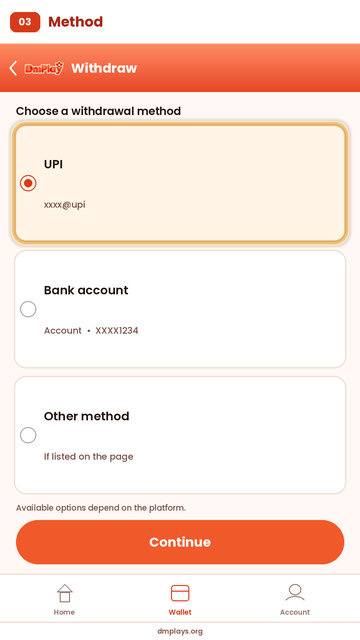
Select from the withdrawal options displayed on your account. Available methods and eligibility may vary.
Step 4: Enter the Required Details
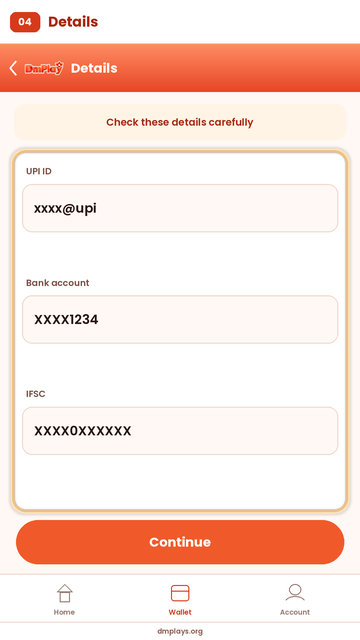
Provide the payment or account details requested on the withdrawal page. Check them carefully before submitting.
Step 5: Read Transaction Rules
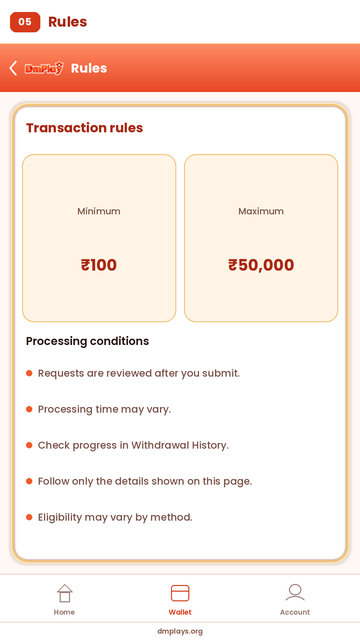
Review the minimum and maximum limits, processing conditions and any other displayed withdrawal rules.
Step 6: Submit Your Withdrawal Request
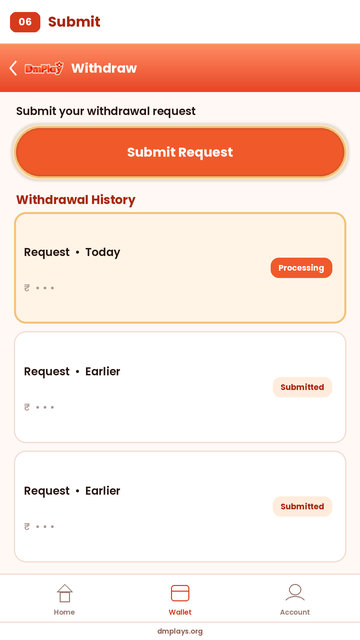
Submit the request and check its progress through the Withdrawal History section.
DMPlay Deposit and Withdrawal Options
DMPlay users can check the Wallet section for the payment methods currently available to their accounts. The available deposit and withdrawal options may differ, so always follow the instructions displayed on the relevant transaction page.
Deposit History and Withdrawal History
The transaction-history sections help users review their previous account activity. Deposit History can be used to check deposit records, while Withdrawal History can be used to review submitted withdrawal requests and their displayed status.
Safety Tips for DMPlay Payments
Always verify payment details before making a transaction. Never share your password, OTP, UPI PIN or other sensitive payment information. Keep transaction references and use the platform’s support options if you need help with a payment.
Refer & Earn with DMPlay
DMPlay may provide referral features through which users can invite other people using an invitation code or personal referral link. Users can check the Partner or Referral section to understand the available programme, eligibility requirements and reward conditions.
Before sharing a referral link, read the current programme rules and check how invitations are counted.
DMPlay Club Gift Code and Partner Rewards
The dmplay club gift code section can be used to explain available promotional codes and reward-related features. Users should check the platform’s current promotions area to find out whether a gift code is active and what conditions apply.
What is the DMPlay Attendance Bonus?
The Attendance Bonus section may provide rewards based on daily account activity. If this feature is available, users can check their attendance record, consecutive login days and the rewards displayed for each day.
On the attendance page, users may be able to check:
- Consecutive login days
- Accumulated bonus amount
- Attendance history
- Game or reward rules
- Daily attendance reward details
DMPlay Attendance Bonus Rewards
The attendance page may display a reward schedule for different login days. The reward amounts and eligibility conditions should be checked directly on the platform because promotional details can change.
How to Claim Attendance Bonus on DMPlay?
Step 1: Login to Your DMPlay Account
Open DMPlay and log in using your registered account details.
Step 2: Go to the Attendance Page
Open the Rewards, Promotion or Attendance section if it is available.
Step 3: Check Your Consecutive Login Days
Review the number of consecutive days displayed on the attendance page.
Step 4: Click on Attendance
If a claim button is available, select it and follow the instructions to record your daily attendance.
Step 5: View Attendance History
Check the attendance-history section to review previous records and the displayed reward status.
What is DMPlay Partner Rewards?
The Partner Rewards section may allow users to invite others through a personal invitation link. Depending on the programme rules, users may be able to view invitation counts, eligible invitations, reward records and other referral details.
How to Use the DMPlay Invitation Link?
Step 1: Open Partner Rewards
Log in to your DMPlay account and look for the Partner Rewards or Referral section.
Step 2: Copy Your Invitation Link
If a personal invitation link is available, use the copy option displayed beside it.
Step 3: Share With Friends
You can share the link through messaging applications or other permitted communication channels.
Step 4: Check Invitation Count
Visit the referral page to review the invitation information displayed in your account.
Step 5: Check Invitation Rewards
Read the programme conditions to understand whether an invitation qualifies for a reward.
DMPlay Invitation Rules
Referral rewards may have eligibility requirements, including registration conditions or other qualifying activities. Read the complete rules shown in your account before participating. Do not assume that every invitation automatically qualifies for a reward.
DMPlay 299 Code
Users searching for a dmplay 299 code should check the platform’s gift-code or promotion section for current availability and applicable terms. A code may have specific eligibility conditions, validity dates or usage limits. Always confirm the details displayed by the platform before attempting to use it.
Benefits of DMPlay Attendance and Partner Rewards
Attendance and partner features can help users review available promotional activities from their account. The Attendance section focuses on daily activity, while Partner Rewards provides information about invitations and referral conditions.
Frequently Asked Questions About DMPlay
1. What is DMPlay?
DMPlay is an online gaming platform where users can explore available game categories, create an account, access their profile and check wallet or reward-related features.
2. How can I register on DMPlay?
Open the registration page, enter the required contact details, create and confirm a password, provide an invite code if applicable, accept the displayed agreement and follow the registration instructions.
3. How do I login to my DMPlay account?
Open the login page and enter the mobile number or other registered details requested by the platform. Enter your password and select Login.
4. What should I do if I forget my DMPlay password?
Open the login page and select the Forgot Password option if available. Follow the displayed recovery instructions to regain access to your account.
5. What payment methods are available on DMPlay?
The available payment methods are displayed in the Wallet or Deposit section. Options may vary depending on platform settings and account eligibility.
6. How can I deposit money on DMPlay?
Log in, open the Deposit section, select an available payment method, enter an amount within the displayed limits and follow the payment instructions.
7. What is the minimum deposit amount on DMPlay?
The minimum deposit amount, if applicable, is displayed on the deposit page. Check the selected payment channel for its current limits.
8. How can I withdraw money from DMPlay?
Open the Withdraw section, review your available balance and withdrawal conditions, enter the required details and submit your request.
9. Where can I check my deposit and withdrawal history?
Look for the Deposit History and Withdrawal History options in your account. These sections display the transaction records and status information made available by the platform.
10. What is the DMPlay Attendance Bonus?
The Attendance Bonus is a promotional feature that may provide rewards based on daily account activity. Check the Attendance section for current rules and eligibility.
11. How do I claim the Attendance Bonus on DMPlay?
If the feature is available, log in, open the Attendance section and follow the on-screen instructions to record your attendance or claim an eligible reward.
12. What are DMPlay Partner Rewards?
Partner Rewards are referral-related features that may allow users to share an invitation link and review qualifying invitations or promotional rewards.
13. How can I recover my DMPlay password?
For dmplay password recovery, open the account login page and use the password-reset option if provided. Follow the verification steps displayed on the platform. Never share your OTP or password with another person.
DISCLAIMER
This website is intended for informational purposes. Game availability, promotional offers, gift codes, account features, deposits and withdrawals may change according to platform rules. Users should review the applicable terms, follow local laws and participate responsibly. Any real-money gaming activity should be restricted to adults who are legally permitted to participate in their location.